Catalog Furniture Set: Professional Design for Modern Businesses
Creating a furniture catalog that actually sells products requires more than just snapping photos of your inventory. The layout, typography, and overall presentation need to communicate quality and style before a customer even reads a single product description. That's exactly where a well-designed template becomes invaluable—especially when you're juggling inventory management, customer service, and the dozen other responsibilities that come with running a furniture business.
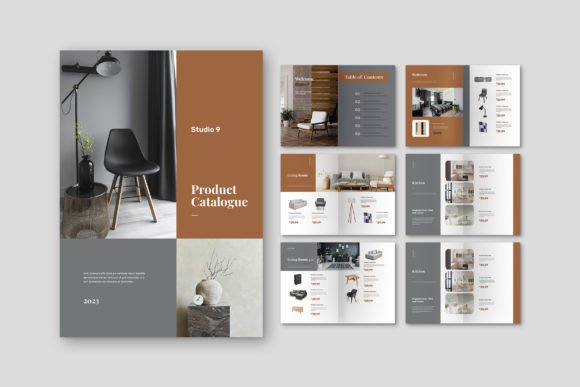
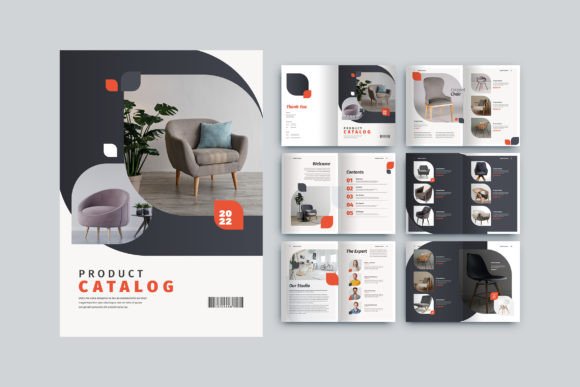
The Catalog Furniture Set template offers a polished, professional foundation built specifically for furniture retailers, interior designers, and home décor brands. At its core, it's an Adobe InDesign template formatted to A4 dimensions (21cm x 29.7cm), featuring 12 custom pages with a modern aesthetic that lets your products take center stage. But what does that actually mean for someone trying to put together a catalog without a design degree or a massive budget?
Why Template Design Matters for Furniture Businesses
Think about the last high-end furniture catalog you flipped through. Whether it was from a Scandinavian minimalist brand or a classic American manufacturer, chances are the layout felt intentional. White space balanced the product images. Typography guided your eye naturally from one section to the next. Colors complemented the furniture rather than competing with it. That cohesion doesn't happen by accident—it's the result of thoughtful design decisions.
For small business owners and independent furniture makers, achieving that level of polish traditionally meant hiring a professional designer or spending weeks wrestling with design software. A template like this changes the equation. Because it was created in Adobe InDesign with neatly organized layers, you can swap out images, adjust text, and modify page layouts without destroying the underlying structure. The 300 DPI resolution and CMYK color format mean your printed catalogs will look exactly as sharp as they do on screen—no unpleasant surprises when the delivery truck arrives from the printer.
Practical Applications Beyond the Obvious
Yes, this template works beautifully for a traditional product catalog. But its versatility extends further than most people initially consider. Here are several ways businesses and creatives are putting templates like this to work:
- Lookbooks for interior designers showcasing completed projects alongside the furniture pieces used
- Trade show handouts that give potential wholesale buyers a tangible reference to take home
- Client presentation packets for custom furniture makers pitching to hospitality or commercial clients
- Seasonal collection launches that feel fresh and timely without requiring a complete redesign each quarter
- Real estate staging proposals where designers present furniture options to property developers
- E-commerce supplementary materials that add a tactile, premium element to an otherwise digital shopping experience
The 3mm bleed requirement is worth noting here. For anyone who's never sent a file to a professional printer, bleed refers to the extra margin around your design that gets trimmed off after printing. Having this built into the template prevents those frustrating white edges that appear when cuts aren't perfectly aligned. It's a small technical detail that makes a significant difference in the final product.
Working With Fonts and Visual Consistency
Typography in a furniture catalog serves a dual purpose. It needs to be readable—customers should effortlessly find prices, dimensions, and materials—but it also needs to reinforce the brand's personality. A mid-century modern furniture line communicates differently than a rustic farmhouse collection, and the typefaces you choose play a major role in setting that tone.
This template includes free fonts, which removes one common headache from the design process. Before committing to a final layout, consider these practical approaches to font pairing:
- Use a bold, distinctive typeface for section headers and product names to create visual hierarchy
- Choose a clean, highly readable font for body text where specifications and descriptions live
- Limit yourself to two or three font families maximum to maintain cohesion across all 12 pages
- Test your text at the actual print size—what looks elegant on a 27-inch monitor might become illegible on a printed page
Visual consistency across your catalog directly impacts brand recognition. When a customer picks up your catalog at a furniture expo and later visits your website, the design language should feel familiar. Using the same typographic choices, color palette, and layout principles across both print and digital touchpoints creates that bridge. This template's modern design sensibility adapts well to digital contexts too—you could repurpose individual page layouts for social media graphics or website banners.
Customization Without the Learning Curve
Adobe InDesign can feel intimidating if you're accustomed to simpler design tools. The layered organization of this template addresses that directly. Each element—text boxes, image placeholders, decorative elements—sits on its own clearly labeled layer. Need to replace a product photo? Navigate to the image layer, double-click the placeholder, and drop in your file. Want to change the background color? That's on a separate layer entirely, so you won't accidentally shift your carefully positioned text.
The .idml file format is particularly helpful for compatibility. If you're working with an older version of InDesign, or if a collaborator uses a different version, the .idml file ensures everyone can open and edit the document without version conflicts. It's a small inclusion that prevents significant workflow disruptions.
For entrepreneurs managing their own marketing materials, this kind of template serves as both a finished product and a learning tool. As you work through customizing the pages, you'll pick up on design principles—how spacing creates breathing room, how alignment guides the reader's attention, how image sizing affects the overall balance of a spread. Those insights transfer to every design project you tackle afterward.
Getting the Most From Your Investment
Time and budget constraints shape every small business decision. A template that costs a fraction of custom design work while delivering professional results addresses both concerns simultaneously. But the real value multiplies when you think beyond a single use. A well-maintained catalog template becomes a living document that evolves with your business. Update it each season with new products. Adjust the color palette when you refresh your brand identity. Add or remove pages as your collection grows or contracts.
Before sending anything to print, always request a physical proof from your printer. Colors shift between screens and paper stocks, and a proof gives you the chance to catch issues before committing to a full print run. Pay particular attention to how your product photography reproduces—furniture textures, wood grains, and fabric patterns should retain their detail and accuracy.
Whether you're launching a new furniture line, refreshing your existing marketing materials, or creating presentation resources for your design studio, starting with a professional template means you're building on solid ground rather than starting from scratch. The hours you save on layout and formatting are hours you can reinvest in product photography, copywriting, and the strategic thinking that actually drives sales.