Unleash Your Editorial Vision with This Fashion-Forward Template
Every great publication starts with a vision—a specific mood, a targeted aesthetic, and a story waiting to be told. For designers, content creators, and entrepreneurs in the style industry, the challenge often lies in translating that high-end editorial vibe into a tangible format without spending weeks on layout construction. If you have ever found yourself staring at a blank Adobe InDesign canvas, wondering how to structure a lookbook or a digital magazine that actually feels like it belongs on a newsstand, the solution might be simpler than you think. The Magazine Template – Fashion Theme offers a sophisticated, professional foundation designed specifically for the modern creative, bridging the gap between a raw idea and a polished, print-ready product.
A Professional Blueprint for Editorial Design
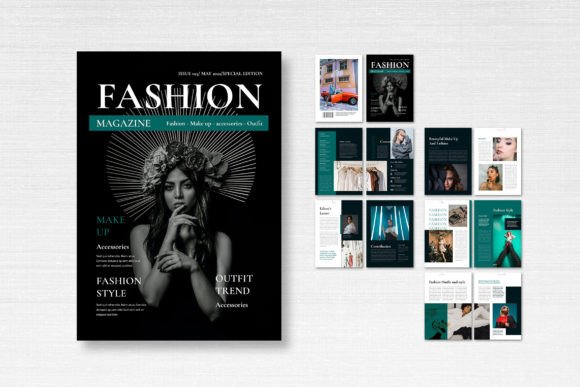
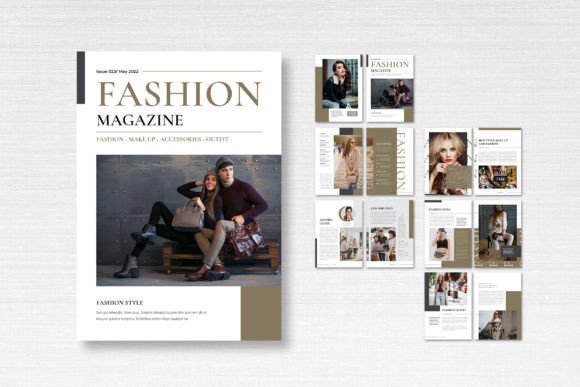
At its core, this template is a masterclass in clean, modern typography and layout structure. It isn't just a collection of empty boxes; it is a thoughtfully curated environment where your content can breathe. The visual appeal lies in its balance. Fashion editorials require a delicate interplay between imagery and text, and this layout respects that relationship. By utilizing a mix of serif and sans-serif font pairings inherent in the design, it creates a rhythm that guides the reader's eye naturally from the headline to the body copy. The aesthetic is decidedly contemporary, favoring ample white space and bold geometric framing over cluttered, busy designs. This makes it an ideal starting point for anyone looking to establish a brand identity that feels expensive, exclusive, and authoritative.
One of the standout features is the attention to technical precision. Built for Adobe InDesign, the file is fully editable, meaning you aren't locked into the original design. However, the foundation is solid. With a standard A4 (21cm x 29.7cm) sizing, it fits perfectly into global print standards. The inclusion of 3mm bleed and 300 DPI settings ensures that when you send this to a professional printer, you won't face the dreaded rejection email about resolution or trim issues. For a small business owner or a freelance designer, having these technical specifications pre-configured saves hours of troubleshooting and prevents costly printing errors.
Beyond the Lookbook: Versatile Applications
While the name suggests a specific industry, the utility of a high-quality editorial layout extends far beyond a seasonal fashion catalog. Think of this file as a versatile container for high-density visual content. If you are a photographer, this is the perfect portfolio format to send to potential clients. If you are a food blogger, the grid system works beautifully for a cookbook or a recipe journal. The 14 custom pages provide enough variety to include a front cover, a table of contents, feature spreads, and a back cover, giving you a complete narrative arc for your publication.
Consider the needs of a modern entrepreneur launching a new product line. You could use this template to create a digital PDF catalog to email to your wholesale buyers. Alternatively, you could adapt the layouts for social media graphics. By isolating specific frames within the InDesign file, you can extract Instagram story templates or Pinterest pins that maintain the exact same visual consistency as your print materials. This kind of cross-channel cohesion is what separates amateur marketing from professional brand identity work. Whether you are designing a lookbook, a corporate brochure, or a niche hobbyist journal, the structure remains robust.
Streamlining Your Creative Workflow
Time is the most valuable asset for any creative professional. The greatest advantage of using a pre-structured Magazine Template is the efficiency it introduces to your workflow. Instead of wrestling with baseline grids and text threading from scratch, you can immediately focus on the content—your images and your words. The file comes with neatly organized layers, which is a crucial feature often overlooked in cheaper assets. When layers are named and grouped correctly, finding specific elements to edit becomes intuitive. You can toggle visibility, lock objects, and swap color schemes with minimal friction.
Furthermore, the template utilizes free fonts, specifically those available on DaFont or Google Fonts. This is a massive practical benefit for commercial use. Often, designers download a template only to find it relies on a premium typeface that costs an extra $50 to license. By sticking to widely available, free-to-use typefaces, this template ensures that your final product is not only beautiful but also legally compliant for commercial distribution. You can maintain the modern typography look without worrying about hidden costs or licensing restrictions later down the line.
Practical Advice for Customization
When you open the file, resist the urge to change everything immediately. Look at the hierarchy established by the template. Notice how the display font is used for impact—large, bold headlines that grab attention—while the body copy uses a highly legible style optimized for readability. This contrast is essential in editorial design. If you decide to swap fonts to match your specific brand voice, ensure you maintain this hierarchy. If your brand is more playful, you might swap the sans-serif for a script font or a handwritten font, but be careful to keep the body text clean and simple to avoid eye strain.
Color theory is another area where this template shines. The default CMYK format is set for print, but if you are creating a digital-only magazine, you will want to convert the color mode to RGB to ensure your screen colors pop. The "Smart Layer" functionality allows you to easily place your images into pre-defined masks. This non-destructive editing workflow means you can experiment with different photos without ruining the layout structure. Always test your font pairings on a few sample pages before committing to the full document to ensure the tone matches your content goals.
Elevating Your Visual Communication
Ultimately, the goal of any design asset is to facilitate better communication. A cluttered, poorly designed brochure can make even a high-quality product look cheap. Conversely, a clean, professional layout lends credibility to your message. This Fashion Theme template does the heavy lifting of visual communication for you. It signals to your audience that you care about details, quality, and presentation.
For the creative entrepreneur or marketer, this is about building trust. When a potential customer flips through your digital catalog or reads your PDF journal, the layout subconsciously tells them that your brand is organized and reliable. It transforms a simple collection of images into a cohesive brand identity experience. Whether you are a designer looking to speed up client delivery or a small business owner trying to create professional marketing materials on a budget, having a reliable, editable InDesign file in your toolkit is a strategic move that pays dividends in visual quality and operational efficiency.