Magazine Template – Fashion Style: A Clean Foundation for Creative Projects
There’s a unique kind of pressure that comes with starting a new editorial project. Whether you’re a designer assembling a lookbook for a client, a small business owner creating a product catalog, or a content creator putting together a digital journal, the blank page can be paralyzing. You have the vision, the content, and the drive, but wrestling with document setup, margins, and initial layouts often eats up the creative momentum. This is where a thoughtfully designed starting point changes everything. The Magazine Template – Fashion Style isn't just a file; it's a structured launchpad designed to handle the technical groundwork, freeing you to focus on what truly matters: your content and your message.
More Than a Pretty Layout: Understanding the Professional Framework
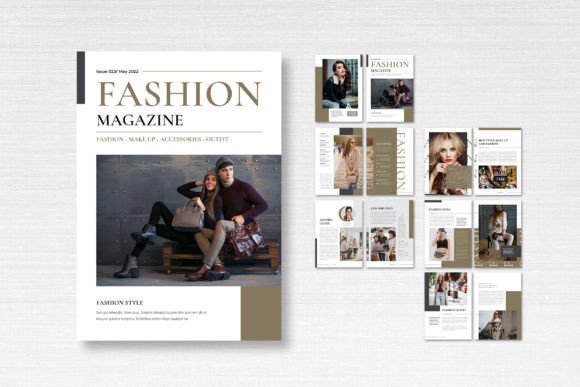
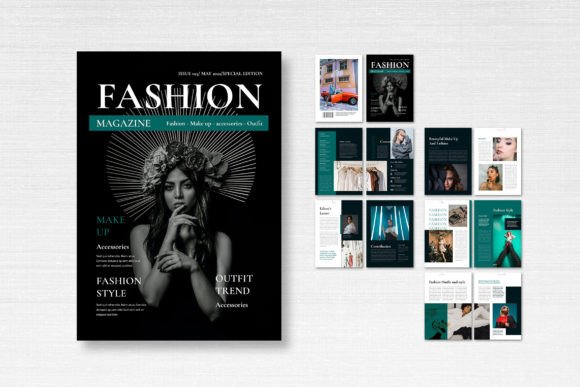
At first glance, this template presents a sleek, contemporary aesthetic ideal for fashion, lifestyle, and editorial content. But its true value lies in its professional-grade architecture. Built for Adobe InDesign, it comes pre-configured with the specifications print shops and digital platforms demand. The A4 size (21cm x 29.7cm) is a global standard, ensuring compatibility. With 300 DPI resolution and CMYK color mode, your designs will translate accurately from screen to print, avoiding the dreaded color shift that can ruin a final product. The 3mm bleed is already set up, a crucial detail for any professional print run that ensures your images and background colors extend perfectly to the edge of the page. This attention to detail means you’re starting with a file that’s ready for the real world, not just a mockup.
The 14 custom pages, including front and back covers, provide a balanced narrative structure. You get a compelling entry point with the cover, space for a table of contents, feature spreads, and a clean closing page. This isn't a random collection of layouts; it's a curated sequence that guides a reader through a story, whether that story is about a seasonal collection, a brand's philosophy, or a curated set of articles. The neatly organized layers and smart objects are a silent productivity booster. Instead of digging through a chaotic layers panel, you can quickly isolate and edit elements, swap placeholder images with your own photography, and adjust text blocks without disrupting the overall design. This structure promotes a non-destructive workflow, allowing for endless experimentation.
Practical Applications: From Brand Identity to Digital Products
The versatility of a clean, professional template like this extends far beyond a traditional magazine. Its core strength is providing visual consistency, which is the bedrock of strong brand recognition. Consider these real-world scenarios:
- Brand Collateral & Lookbooks: A fashion startup can use the entire template to create a cohesive lookbook that showcases their collection. The consistent grid, typography, and spacing across all pages reinforce a polished, established brand identity from the very first touchpoint.
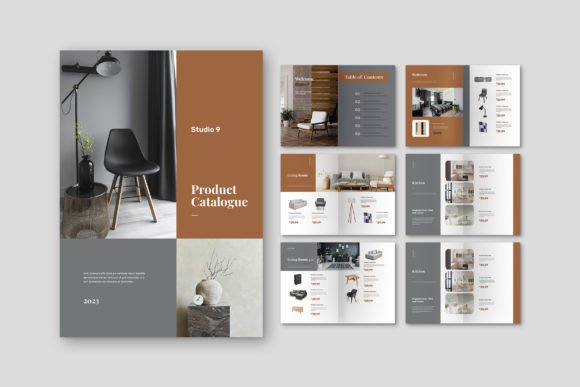
- Product Catalogs & Journals: For a small business selling artisanal goods, this template transforms into an elegant catalog. The structured layouts allow product images to shine alongside descriptions and pricing, presenting merchandise in a curated, editorial light rather than a simple list.
- Digital Products & Lead Magnets: Content creators and marketers can adapt the pages to produce stunning digital guides, lookbooks, or exclusive journals offered as email sign-up incentives. The high-resolution design ensures it looks sharp on any screen, enhancing perceived value.
- Event Programs & Invitations: The sophisticated layout is perfect for upscale event programs, wedding invitations, or gala dinner menus. The clean typography and ample white space convey elegance and importance.
- Portfolio Presentations: Designers and photographers can repurpose the template as a portfolio book. The variety of page layouts allows for single-image spreads, grid presentations of multiple projects, and text-driven case studies, all within one unified document.
The included free fonts, sourced from reputable places like DaFont or Google Fonts, are a practical starting point. They’re chosen to complement the template’s modern aesthetic, ensuring text is readable and stylish. However, the true power is in the customization. You can easily swap these fonts with your own brand typefaces—a premium serif for headlines and a clean sans-serif for body text, for instance—to create a completely unique publication that is unmistakably yours.
Elevating Your Project: The Details That Make a Difference
A template’s utility isn’t just in its layout, but in how it improves your end result and your process. Using a professional starting point like the Magazine Template – Fashion Style directly impacts key areas of your project’s success.
- Visual Consistency: Pre-set paragraph styles, character styles, and object styles ensure that every headline, subheading, and caption looks uniform. This eliminates the guesswork and manual adjustments that lead to inconsistencies, making your publication look like it was produced by a seasoned design studio.
- Streamlined Workflow: The organized layers and master pages are game-changers. Need to change the page numbering style or add a running footer? Adjust it once on the master page, and it updates across the entire document. This saves hours of tedious work.
- Professional Presentation: The 3mm bleed and CMYK setup mean you can send your file directly to a professional printer with confidence. For digital use, the high DPI ensures crisp text and images on retina displays and in PDFs, which reflects directly on your brand’s credibility.
- Creative Focus: By removing the technical barriers of document setup, you can dedicate your energy to curating content, refining your copy, and selecting the perfect imagery. The template handles the “how,” so you can focus on the “what” and “why.”
When choosing a template, consider the personality of your project. The “Fashion Style” here suggests a clean, modern, and airy feel—ideal for contemporary brands. If your project has a vintage, grunge, or highly technical tone, you might need to adapt the template more heavily or choose a different one. Always review all included pages to ensure the layout variety meets your content needs. Do you have enough full-bleed image pages? Enough text-heavy layouts? Does the grid system support your typical content, like long-form articles or short social media-style captions?
Getting Started: A Mindful Approach to Customization
Diving into the template is straightforward, but a mindful approach will yield the best results. Start by defining your color palette. The template likely uses a neutral base, but you can instantly infuse your brand’s personality by updating the color swatches in InDesign. Next, establish your typography hierarchy. Will you use the provided fonts, or import your own? Define which font will be used for main headlines, secondary headlines, pull quotes, and body text. Consistency here is non-negotiable for a professional look.
When replacing placeholder images, aim for high-resolution originals that match the template’s 300 DPI setting. Pay attention to how images are masked or framed within the layouts—this is part of the design’s appeal. Don’t just drag and drop; consider the composition within each frame. Finally, proofread meticulously. A beautifully designed document loses all credibility with a typo in the headline. The template gives you the stage; your content must deliver the performance.
Ultimately, tools like the Magazine Template – Fashion Style are about empowerment. They democratize professional design, allowing entrepreneurs, creators, and small teams to produce materials that stand shoulder-to-shoulder with those from large agencies. It’s not about cutting corners; it’s about starting smart. By leveraging a solid, well-structured foundation, you ensure that your vision is presented with the clarity, consistency, and professionalism it deserves, making a powerful impression on your audience from the very first page.